
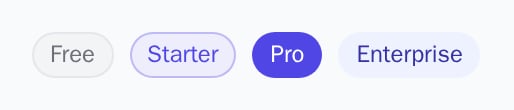
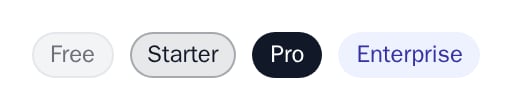
PlanBadge shows a plan name as a pill, coloured by one of four tiers and your theme.
When to use
- Next to the account or workspace name in your app’s header or menu.
- In a team or customer list.
- On a feature that needs a higher plan.
- Light
- Dark
- Minimal
- Neobrutal
- Nozle
- Nozle Dark




Importing PlanBadge
Rendering PlanBadge
Pass any text asplan and pick a tier for the colour:
components/account-menu.tsx
Data
The badge needs only a label and a tier; it does not read or know your plans.Live data
Take the plan name fromuseSubscription and choose the tier from the plan code yourself:
Examples
Tiers
The four tiers:free (muted), starter (tinted primary), pro (primary) and enterprise (accent).
API reference
string
required
The text of the badge.
'free' | 'starter' | 'pro' | 'enterprise'
default:"free"
The colour:
free uses colorMuted with a border, starter a tint of colorPrimary, pro colorPrimary, enterprise colorAccent.Appearance
Theme, variables and element overrides on top of the provider’s. See Appearance.
Appearance
Element keys
Element keys
planBadge (the pill).Style them with appearance.elements. See Elements.Related
CurrentPlan
The plan with status, price and usage.
PlanGate
Shows content only on some plans.