
UpgradeButton opens an UpgradeModal for one target plan and, when the customer confirms, starts the change through createCheckout on BillingProvider.
When to use
- Next to the current plan in billing settings (“Upgrade to Scale”).
- In an
UpgradePromptor usage notice that names the next plan. - A plan change that needs a confirmation step with the price difference.
PlanChangeControl.
- Light
- Dark
- Minimal
- Neobrutal
- Nozle
- Nozle Dark
Importing UpgradeButton
Rendering UpgradeButton
Render it inside aBillingProvider with createCheckout (see Configure BillingProvider) and reload billing data when the change is done:
components/upgrade-to-scale.tsx
What a confirm does
The button callscreateCheckout with the plan code, return URL and the subscriptionId, quoteId and idempotencyKey you pass, then handles every checkout result: Stripe client secret, Razorpay, hosted, processing, completed and scheduled. The dialog closes and:
- calls
onCheckoutStartedafter a Stripe client secret was handed toonStripeClientSecret, - calls
onUpgradedwhen the change completed, or a Razorpay payment was captured, - calls
onDowngradeScheduledfor ascheduledresult.
Data
preview holds the amounts shown in the dialog, in major units (dollars, not cents):
Live data
useUpgradePreview(planCode) reads the quote for a plan change from your billingEndpoint. Its amounts are minor units and it has no separate credit and debit, so it does not fit ProrationPreview. Pass its quote_id as quoteId, and show its amounts in an UpgradeModal you control, or use PlanChangeControl, which shows the exact quote.
Examples
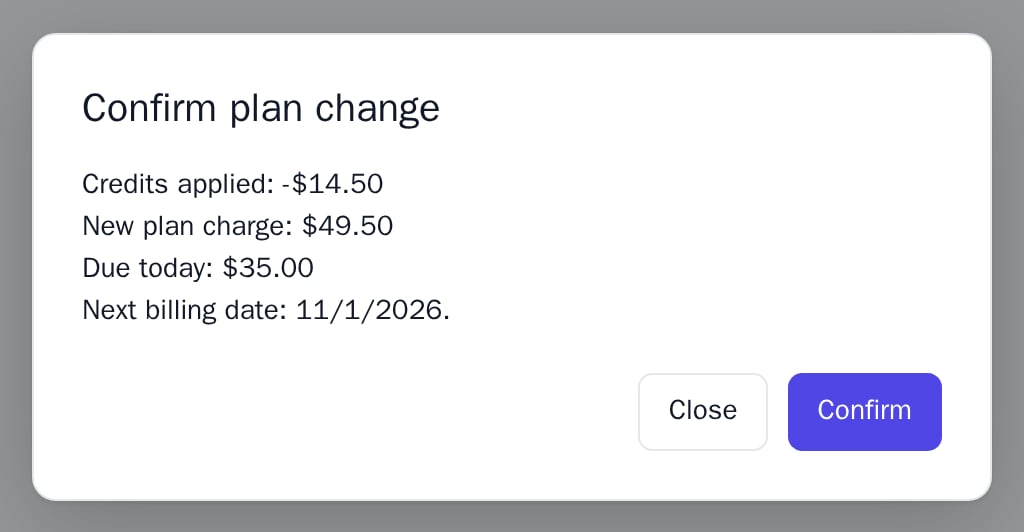
The confirmation dialog
A click opens the dialog with the amounts frompreview: credits applied, the new plan charge, the amount due today and the next billing date.
API reference
string
required
The plan to change to, sent to
createCheckout.string
default:"Upgrade"
Button text.
ProrationPreview
Amounts shown in the dialog, in major units:
credit, debit, net, nextBillingDate and optional currency (defaults to USD). See UpgradeModal.string
The customer’s external subscription ID, sent to
createCheckout to change that subscription. Not sent when left out. subscriptionId, quoteId and idempotencyKey need React 0.10.0 or later.string
A server-issued quote the customer saw, sent to
createCheckout. Not sent when left out.string
Sent to
createCheckout. Reuse the same key when retrying the same change. Not sent when left out.string
Sent to
createCheckout. Defaults to the current URL.(clientSecret: string) => void
Fires for an embedded Stripe checkout and receives its client secret; render
Checkout with it. Without it the dialog closes and the secret is not used.() => void
Fires after a Stripe client secret was handed over. The dialog closes.
() => void
Fires when the change completed, or a Razorpay payment was captured. The dialog closes.
() => void
Fires for a
scheduled result. The dialog closes.(error: Error) => void
Fires when the change fails and receives the error. The dialog stays open and shows the message.
string
Class name on the button.
CSSProperties
Inline styles on the button.
Appearance
Used for the button and the dialog. Defaults to the provider’s. See Appearance.
States
Appearance
Element keys
Element keys
upgradeButton (the button), and the dialog’s upgradeModal, upgradeModal__dialog, upgradeModal__actions.Style them with appearance.elements. See Elements.Related
UpgradeModal
The dialog on its own, with your open state.
PlanChangeControl
Plan picker with exact quotes and payment recovery.
CheckoutButton
Checkout without a confirmation step.
Checkout
The Stripe payment step.