
CancellationControl renders “Cancel subscription” for an active subscription, or “Keep my subscription” for one that is ending, and confirms the date from your backend’s preview in a dialog.
When to use
- The subscription section of your billing settings page.
- Cancellation at the end of the period, with the exact end date from your backend.
- Keeping (uncancelling) a subscription before its end date, with the next renewal date.
BillingPortal renders this control for you when you pass cancellationActions.
- Light
- Dark
- Minimal
- Neobrutal
- Nozle
- Nozle Dark
Importing CancellationControl
Rendering CancellationControl
Pass the subscription,actions and refresh, which call your authenticated backend for the signed-in customer (see Live data):
components/cancel-plan.tsx
refresh. “Check status / retry” retries with the same idempotency key.
Data
subscription and refresh use the CancellationSubscription shape:
Live data
Createactions and refresh once, outside the component:
lib/cancellation-actions.ts
refresh for the signed-in customer. Reject a changed end date on the server with HTTP 409. Use the subscription’s external ID for these calls and keep its Core id for portal reads. See Cancel and Keep for the server side.
Data from the API
Examples
Cancel dialog
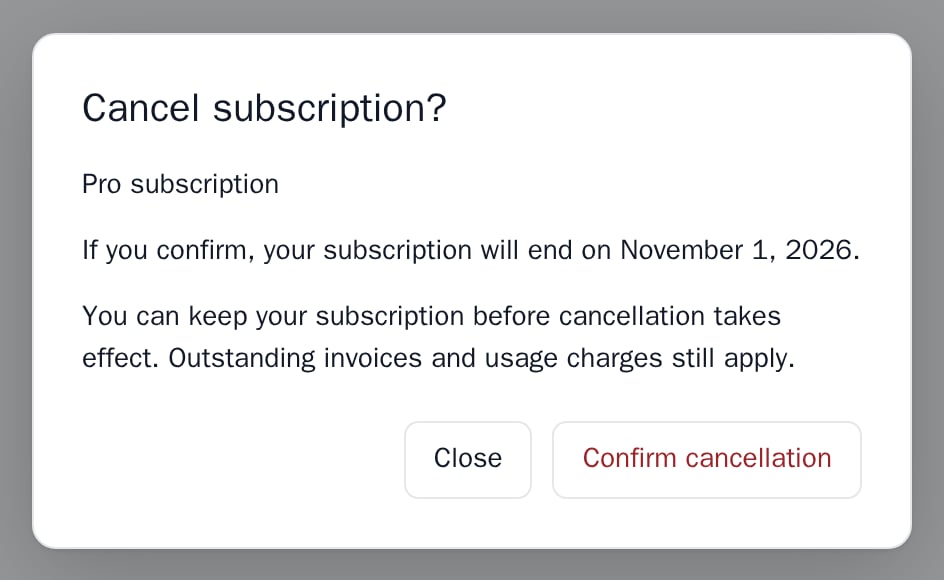
“Cancel subscription” opens a dialog with the end date frompreview, a note that invoices and usage charges still apply, and “Confirm cancellation”. When pendingPlanName is set, the dialog also says that the scheduled plan change will be removed and that keeping the subscription later will not restore it.
Keep an ending subscription
WhenendingAt is set and has not passed, the button reads “Keep my subscription”. Its dialog says “Your current plan will continue to renew on <date>.” and offers “Confirm keep subscription”.
API reference
CancellationSubscription
required
The subscription. The button shows only when
status is active and endingAt has not passed.CancellationActions
required
Your backend callbacks.
(signal: AbortSignal) => Promise<CancellationSubscription | null>
required
Reads the saved subscription before each preview and after every attempt; the control checks it to decide whether the change took effect.
() => void
Fires after a cancellation or keep is confirmed by
refresh.(error: BillingPortalError) => void
Fires when a request fails and receives the
BillingPortalError.string
default:"en-US"
Formats the dates (long style, for example “November 1, 2026”). The text is English.
string
default:"UTC"
Time zone of the dates: an IANA name, or a Nozle
TZ_ name.string
CSP nonce for the control’s
<style> element.Appearance
Theme, variables and element overrides on top of the provider’s. See Appearance.
States
The dialog closes with Escape or Close, not while busy.
Appearance
Element keys
Element keys
cancellationControl (root, also class nozle-cancellation).Style them with appearance.elements. See Elements.Related
PlanChangeControl
Upgrades, downgrades and scheduled changes.
BillingPortal
The whole customer portal, with this control inside.
Billing portal and self-service
Backend adapters and runnable examples.
CurrentPlan
Shows “Ends <date>” for a cancelled subscription.